
Passkey lifecycle in Pico FIDO: creation, use, revocation, and expiration
A passkey is not only created and used. It also has a lifecycle: it is provisioned, used, managed, retired, and sometimes replaced. Pico FIDO gives resident passkeys explicit lifecycle metadata so that an authorized operator can distinguish an active credential from one that should no longer be used.
This is especially useful for managed devices. A passkey can be associated with a person, application, team, or temporary assignment. When that assignment ends, the credential should not simply remain an invisible entry on the authenticator.
The lifecycle metadata described here applies to resident/discoverable credentials. Pico FIDO keeps older resident records readable for compatibility, but the expiration and revocation controls are implemented for credentials stored in the current resident-container format. Non-resident credentials are governed by the relying party and the normal authenticator policies instead.
The lifecycle at a glance
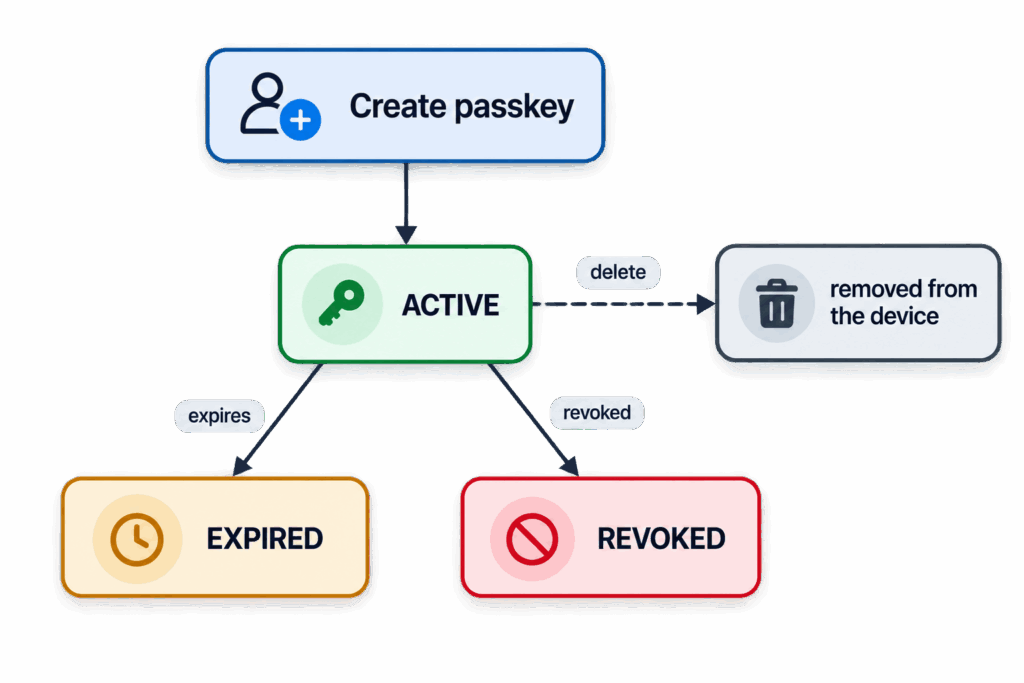
The current Pico FIDO implementation uses three states for resident credentials:
- Active: the credential can be used, subject to the normal RP, PIN, user-verification, and user-presence policies.
- Expired: the credential is no longer usable because its expiration time has passed.
- Revoked: an authorized operator has explicitly disabled the credential.
Expired and revoked credentials are not erased automatically. They remain distinct records so that credential-management tooling can identify what happened and an operator can make an informed decision about deletion or re-registration.
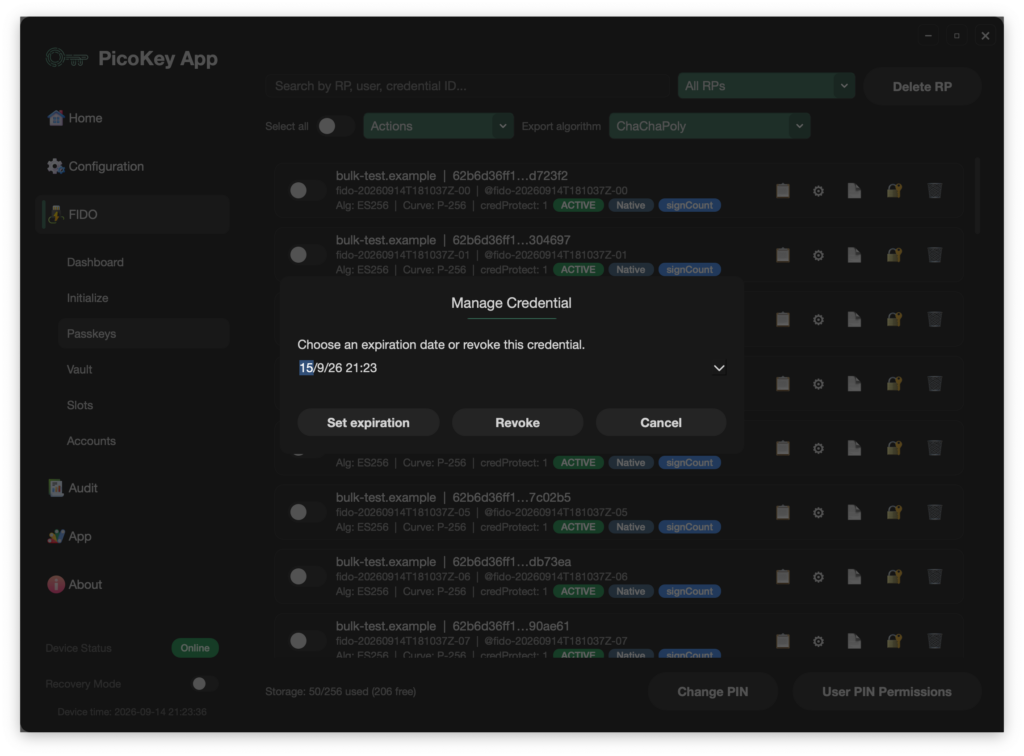
Creation: a resident passkey starts active
When a relying party requests a discoverable credential, Pico FIDO stores the resident credential in one of its resident slots. New resident credentials use an authenticated container that keeps the credential’s related pieces together: the relying-party binding, resident identifier, credential data, public key, and mutable state.
The initial lifecycle metadata is simple:
status:     active
origin:     native
expiration: none
Credentials imported through Pico Vault use the same resident-credential path but are marked as imported. That property is separate from lifecycle status: an imported credential can be active, expired, or revoked just like a native one.
The lifecycle metadata is not the private key. The credential remains protected by Pico FIDO’s normal storage and authorization rules, while the state used for lifecycle decisions is authenticated and mutable.
Use: every assertion checks usability
Before Pico FIDO uses a resident credential, it checks that:
- The credential belongs to the requested relying party.
- The credential can be loaded successfully.
- Its lifecycle status is active.
- Any configured expiration has not passed.
- The normal PIN, user-verification, user-presence, and credential-protection requirements are satisfied.
If a credential is expired or revoked, Pico FIDO does not produce an assertion for it. To a caller looking for an available credential, the result is the normal “no credentials” outcome. This applies both when a credential is selected explicitly by credential ID and when resident credentials are discovered for a relying party.
Revoking one credential does not disable the other credentials stored on the device. Each resident credential has its own lifecycle state.
Revocation: disable without deleting
Revocation is intended for an explicit administrative decision: a device is being reassigned, a user has left an organization, a credential is suspected of misuse, or a particular registration must be retired while other credentials remain available.
An authorized configuration operation changes the selected resident credential’s status to revoked. The operation requires an authenticator-configuration PIN authorization. The credential can be selected by its resident credential ID or, for compatibility, by its resident slot.
The effect is immediate at the authenticator boundary:
before: assertion succeeds
revoke: status changes to revoked
after:  assertion is rejected
Revocation is deliberately different from deletion:
| Operation | Result | Record remains for management? | Reversible in current firmware? |
| Revoke | Stops the credential being used | Yes | No |
| Delete | Removes the credential from the device | No | No |
The current implementation does not provide a reactivation operation. An active credential may become revoked or expired, but a revoked or expired credential cannot be returned to active status through the metadata update path. If the user needs the access again, the practical path is to create a new credential and register it with the relying party.
What revocation does not do
Pico FIDO revocation is local to the authenticator. It prevents that device from using the resident credential, but it does not notify a website or change the relying party’s account database.
For a complete offboarding or incident-response process, the relying party should also remove or disable the corresponding credential in the user’s account. This matters because a relying party may already have stored the credential’s public key, and revocation inside one authenticator cannot invalidate another copy that may exist elsewhere.
In other words:
Pico FIDO revocation = stop use from this authenticator
RP-side removal     = stop acceptance by the service
Managed deployments should normally perform both actions when access must be fully withdrawn.
Deletion: final removal from the device
Deletion is the storage lifecycle operation. Through credential management, an authorized client can delete a resident credential. Pico FIDO removes the logical resident container and its associated records, then commits the change using its authenticated storage update process.
Deletion is appropriate when the credential is no longer needed and the operator does not need to retain its lifecycle state on the device. It is not a substitute for RP-side removal: deleting a credential from Pico FIDO does not remove the corresponding registration from a website.
Expiration: time-bounded credentials
Expiration fits naturally into the same lifecycle model. A credential can be assigned a Unix timestamp, and Pico FIDO checks that timestamp against its real-time clock when deciding whether the credential is usable.
The firmware already contains the expiration field and the vendor configuration command needed to set it. The operation requires:
- an authenticator-configuration authorization;
- a configured device real-time clock; and
- a four-byte expiration timestamp.
Until the timestamp is reached, the credential remains active. Once the device time reaches or passes the timestamp, Pico FIDO treats the credential as expired and rejects assertions for it. An expiration timestamp of zero means that no expiration is configured.
Expiration is useful for temporary access, contractor credentials, test accounts, short-lived enrollment ceremonies, and credentials that should be reviewed periodically. It also provides a useful policy building block for organizations that do not want every credential to be indefinite.
The current firmware exposes this capability through its vendor configuration path. PicoKeyApp may add a user-facing expiration control later, which would make the same operation available without requiring a separate low-level configuration client.
Seeing lifecycle state
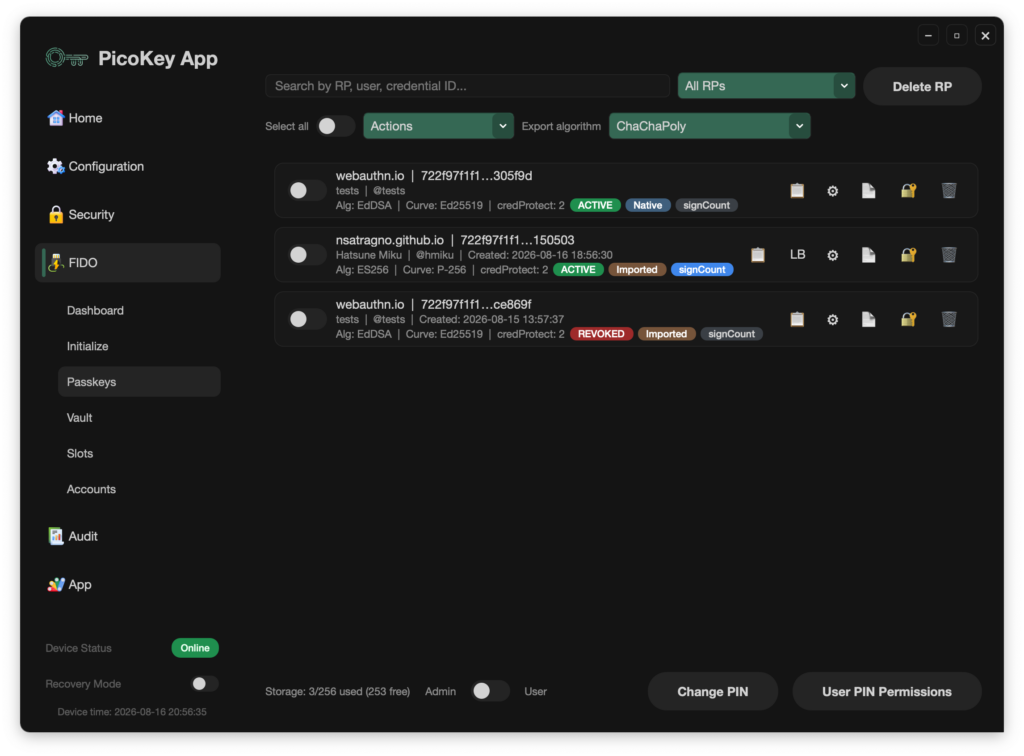
The standard credential-management flow lists credentials that are available for normal management. The Pico FIDO vendor extension can also return implementation-specific metadata, including:
- lifecycle status;
- native or imported property;
- expiration timestamp; and
- resident slot.
That distinction lets administrative software show a useful history instead of treating every unavailable credential as if it had simply disappeared.
A lifecycle policy for managed Pico FIDO devices
A practical policy can be straightforward:
- Create one resident credential per user and relying-party registration.
- Keep credentials active only while the assignment is valid.
- Set an expiration time when access is temporary or requires periodic review.
- Revoke immediately when the credential must stop working from the device.
- Remove the corresponding registration at the relying party.
- Delete the credential from the device when its local record is no longer needed.
- Register a new credential instead of trying to reactivate an expired or revoked one.
This gives Pico FIDO a clear, auditable local lifecycle while preserving the relying party as the authority that decides which public-key credentials are accepted for an account.